


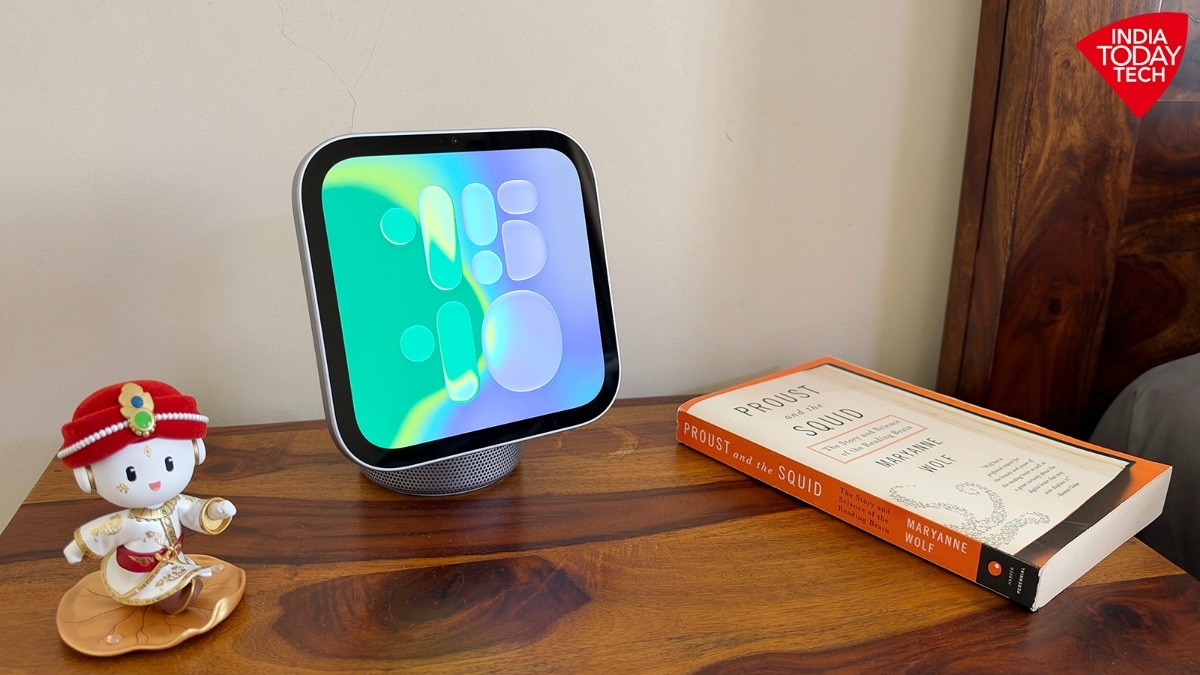
A few weeks ago Apple added a new product to its lineup. This is HomeView, a smart hub that is supposed to connect to all other compatible smart appliances and lights in your home.
And then you can control all those devices through either the HomeView screen or by using voice commands to Siri. The idea is not new.
Other companies have been trying on the same lines. There is Amazon with its Alexa devices.
There is Google with its Home, now called Nest, devices. But the arrival of smarter AI has opened fresh possibilities.
Apple is now entering the category to explore them by combining in HomeView all of its hardware expertise with a smarter Siri.The HomeView, which I have been trying for over a week, is a product I would call classic Apple. It is a marvel in terms of its engineering and design: fabulous looks, tastefully crafted, and with hardware that is the absolute best in the category.
But unlike in segments where Apple can win solely by creating the best product, the smart hub is a market where it is more about the ecosystem and less about the product. Currently, this smart home ecosystem is still in the early stages, particularly in India.Superb hardware and design The smart hub features an aluminium body inspired by Apple's iMac G4.
Before I talk about the HomeView that I have been using, a few words about the variants: It is available in two flavours. One, which you can see in the images in this review, combines a small speaker with a square display.
This is supposed to be used as a countertop or tabletop device. Then there is the variant which is just the display, along with embedded speakers, similar to a small square iPad.
That is supposed to be used as a wall-mount. Both have the same price.I tried the tabletop variant.
When I took it out of its box, my first impression was — well, this is small. We know the HomeView has a square screen, measuring 7 inches diagonally.
But still when you take it out from the box, you will likely be surprised by its compact and diminutive size. From left to right, the device measures a mere 5.7 inches.
My second impression after using the device for around 10 minutes was — wow, it sure punches above its weight. Whether you find the HomeView diminutive or just the right size, you will likely be extremely impressed by its design and build quality.
Apple has borrowed the shape and ideas from the iMac G4, which was launched over two decades ago. In the HomeView the design has been made thoroughly modern with cleaner lines and more exotic metal alloy.There are two key parts here.
One is the base, a half-cylindrical block of milled aluminium. It houses the speaker and a few other components.
On top of it there is a shiny metal hook that connects to the square display, also housed inside an aluminium shell. Compared to the wall-mounted version, the one with the attached speaker has a down-firing woofer and passive radiators.
Otherwise the two HomeView variants are similar. They need to be connected to a power source — an adapter and cable is supplied with them.Like noted earlier, the build quality of the HomeView is fantastic.
It is — by far — the best built smart home hub I have tried. It feels remarkably solid with all the metal inside it and the quality of aluminium is top notch.
Even the base under the speakers, which has a rubber layer so it stays secure on a counter or table shows Apple has cut no corners when it comes to materials and build of the HomeView. You keep it in an expensive looking room and it will be right at home.The shiny metal hook, which connects the display and the speaker module, does not swivel.
But it tilts up and down quite liberally.The HomeView is powered by Apple A18 chipset, which is slightly old but is significantly more powerful than what you otherwise get in such devices. The rest of the hardware is similar — best in class.
The display has a resolution of 1088 x 1088 pixels. For a smart home display, the quality of the panel is excellent and resolution is good enough.
Apple HomeView supports music playback and FaceTime video calls. Using the HomeViewThere is a reason why smart home hubs are still not a necessity in houses.
Not in India, not even in more mature and richer markets like the US. They are not standalone products.
Instead, their utility comes from the ecosystem.I realised it — yet again — as soon as I started setting up the HomeView. To begin with, you need a recent iPhone or iPad to set up the device.
Essentially, you must be in the Apple ecosystem before you can use the HomeView. The setup process is easy.
All you need to do is bring your iPhone closer to the HomeView and then just follow a few instructions.The HomeView supports multiple users at the same time. You use the device with your ID and face and it will show information relevant to you.
And your partner can do the same, using their ID and face. The HomeView automatically recognises who is looking at it, and accordingly adjusts its home screen as well as its features.So, what can it do?
The idea is that the HomeView can be a smart home hub for users. The problem, which I faced and most users will face in India, is there is not much you can connect to it.
Accessories that support Apple HomeKit aren’t that common. And even if many of them are there in the market, usually people are not specifically shopping for something they can connect to their Apple devices.If you don’t have a “smart house” you can connect to HomeView, what all it can do then?
I believe plenty, although your mileage will vary depending on which technologies you use and how you use them.Let me briefly list the use cases that I found truly and meaningfully enjoyable with the HomeView:Plying songs through Apple Music: This, I believe, is going to be the most notable use case for HomeView, at least in India. And this is also the reason why I would recommend that you get the tabletop version of the device.
You can either open the Apple Music app on your iPhone and then move the sound to HomeView, or you can use its screen to control the app. Alternatively, you can also speak to Siri to play the songs you desire, although Siri can still fumble when it comes to personal playlists.The sound quality from the tabletop version of the HomeView is fantastic.
Despite its small size it can belt out surprisingly hefty bass and pleasantly clean vocals. It is also, despite its small size, loud enough to fill a middling drawing room — say 220 to 250 sq feet — with sound.Make FaceTime Video and Audio calls: Music playback is nice but this here is my favourite feature of the HomeView.
It is fantastic for making audio and video calls. You can keep it on a table somewhere in a room and then can roam around while talking to whoever you are speaking to.
Its 12-megapixel camera even tries to keep you in “centre” by following your voice.The feature also works extremely well when you are doing family calls with multiple people in it.HomeView as a bedside companion: Another aspect where HomeView works as a fantastic device is if you use it as a bedside companion. It can, with its various home screens that have been inspired from Apple Watch Faces, show you the kind of information you want at a glance.
It could be weather information when you wake up in the morning. Your calendar details.
Maybe just date and time. The device can double as a bedside companion with alarms, weather and calendar updates.
Currently there are 11 home screens. These range from a highly-personalised photo-frame to show images that get pulled from the Photos app, to live camera view through a smart accessory.
Then there are playful screens, like Flow that adjusts the floating blobs on the screen according to your movement in the room, and the animated Snoopy that can entertain kids as well as adults. My favourite though is Fade, a home face that fades hours as time moves forward.The HomeView also works great as a bedside companion because it can let you do late night calls while you are snugly tucked inside your bed.
You can set alarms. Or you can talk to Siri about the meaning of life.
Or issue commands to it. For example, after waking up you can simply ask Siri to tell you the schedule that you had planned earlier in your calender, or you can ask Siri for the news of the day.Of course, the HomeView can also be used for some other purposes.
You can use it to follow recipes while cooking. Or you can watch something on it, for example videos through the Apple Podcast app.
You can also read stuff even if its small screen size means it is not a device created to read books. And, as noted earlier, you can use it as a “hub” that shows feeds from your smart CCTVs or smart doorbell.Similarly, there is utility built into the HomeView through its sensors.
The device shows humidity and temperature in a room. It has a light meter, which detects the ambient light inside the room and at night, after you are tucked in and have switched off lights, and then automatically dims the display to move to Apple’s fantastic red-tinted night mode.
Using its microphones, the HomeView can also detect the sound of a fire alarm and then notify you on your phone. It is a useful feature to have, although I hope no one will ever need it.Overall, the HomeView offers a slick experience.
It looks great, and its display is fantastic even if the square shape doesn’t lend itself well to video watching. Its software is clean and minimalistic — typical Apple.
But having said that, it is also a limited device. One big limitation is that the third-party apps are not supported.
This means no YouTube on it, although you can access it through Safari. The lack of third-party apps means that, at least for now, the only way to use HomeView is the way Apple wants it to use.
Is that enough for you? You be the judge of it.Should you buy HomeView?It depends.
Like I noted earlier, this is not an essential device. Like an iPhone.
Or a Mac. Or even a HomePod.
It is an ecosystem device, which means the better and deeper you are in the Apple and smart things ecosystem, the more useful you will find the HomeView. Currently, not many people in India have the kind of smart homes where a smart hub would be useful.
If you do have such a home, you will find that the HomeView is the best hardware and software experience in this space.Beyond the ecosystem, the utility of the HomeView depends on the specific use cases. As a bedside companion it is fantastic.
But is it worth Rs 39,900? You be the judge of it.
I think for some people who must have the absolute best, it is worth paying for the HomeView even if they are only going to use it as a tabletop device to play music and see date and weather. Similarly, this is a fantastic device for family FaceTime calls.
But is it worth Rs 39,900 or should you just prop up your iPhone on a stand or a couple of books? Well, it depends on your taste and the amount of money you are willing to spend on something niche.The HomeView is also, I believe, can be a good device for institutional buyers.
For example, hospitality businesses looking to create smart rooms for their clients who all have iPhones, they can probably use it in some way. Similarly, it is great for someone who is creating a smart home from scratch and has money and means to go whole hog into the Apple ecosystem and devices.I can see, with reservations, that there is value in getting a HomeView for your bedroom or drawing room, and more so if you already own a few Apple devices like iPhone, HomePod, and iPad.
But I also believe it should not be a device high on your shopping list. The HomeView does what it promises to do extremely well, and looks great while doing it all.
But it doesn’t do a lot, not at the moment.- Ends